Minimum Version Required: 23.01
Pre-Conditions
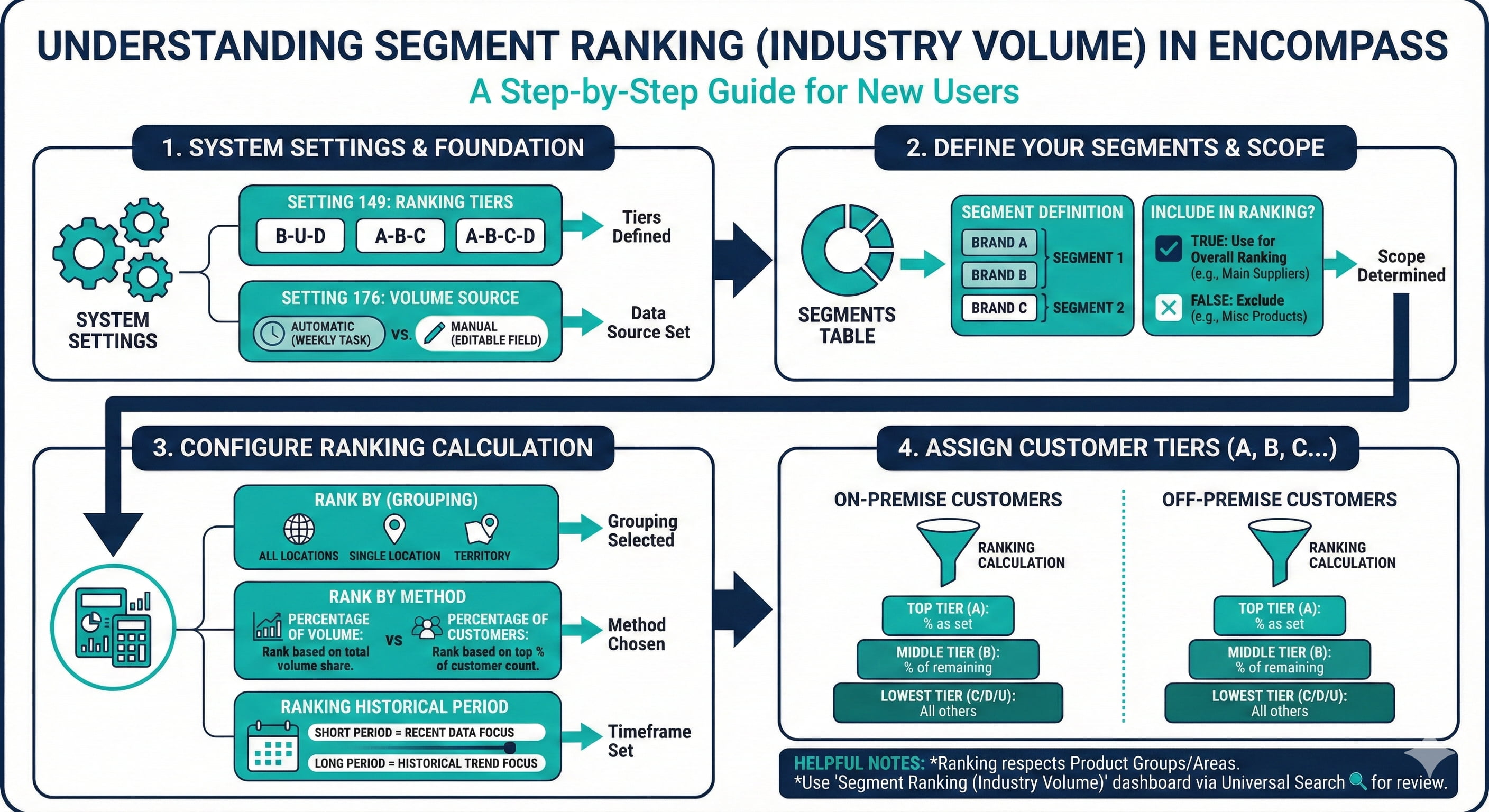
System Setting 149 determines how your rankings are set. Options are B-U-D, A-B-C, and A-B-C-D
System Setting 176 determines whether Industry Volume is calculated by the system (using a Weekly Scheduled Task) or if it is an editable field on the Customer table that users can set
Steps
System Setting 149 determines how your rankings are set. Options are B-U-D, A-B-C, and A-B-C-D
System Setting 176 determines whether Industry Volume is calculated by the system (using a Weekly Scheduled Task) or if it is an editable field on the Customer table that users can set
The Segments Table determines how Segments are set in the system.
Segments are often similar to Product Types, but can be set separately. Each Brand is associated with a different Segment.
When Include in Overall Ind Volume Ranking is set to True, Brands in the Segment will be used to determine a customer's Industry Volume ranking. If this is set to False, this Segment will not be used for Ranking. For example: You may want only your main Supplier(s) to be used for ranking, so you would create a Segment of only that Supplier's brands and only set that Segment to Include in Overall Ind Volume Ranking = True. Typically miscellaneous products, dunnage, etc. are all put into a Segment where this field is False.
The Rank By field determines how Customers are grouped to be ranked. This can be for All Locations, within a single Location, or by Territory
Encompass has two possible Rank By methods for each Segment:
Percentage of Volume: Ranks Customers according to how much of the total volume sold they were responsible for. Example: If you have 10 customers and you rank the top 20% as A customers and a single customer is responsible for 20% of the total volume done, then that customer would be your only A customer. If two customers together did 20% of the total volume, then they would both be A customers.
Percentage of Customers: Puts a specific percentage of Customers in each tier. Example: If you have 10 customers and are ranking the top 20% as A customers, the system will rank the top two Customers by Segment volume as your A customers, regardless of what that volume was.
The Ranking Historical Period field determines the historical period over which the system looks at volume to determine ranking. Example: If this field is set to 12 months, then when the weekly scheduled task will run a report looking at 12 months of data to determine new rankings. Because of this, the shorter the period, the more impact recent data will have on these rankings.
On-Premise A Percentage determines what percentage of Customers (as determined by the Rank By method) are included in the top tier for On-Premise Customers
On-Premise B Percentage determines what percentage of the remaining Customers (as determined by the Rank By method) are included in the middle tier for On-Premise Customers
All other Customers will be considered in the lowest tier.
Off-Premise A Percentage determines what percentage of Customers (as determined by the Rank By method) are included in the top tier for Off-Premise Customers
Off-Premise B Percentage determines what percentage of the remaining Customers (as determined by the Rank By method) are included in the middle tier for Off-Premise Customers
All other Customers will be considered in the lowest tier.
Notes:
Segment Ranking will respect Product Groups and Product Areas. So, only Customers authorized to buy a specific segment will be included in its ranking.
To review Segment Ranking in one place, please use the Segment Ranking (Industry Volume) link which can be accessed from Universal Search. This dashboard provides an overview of the current segment ranking setup and allows users to report on their segment ranking based on current settings.
Fields And Definitions
Segment Ranking and Industry Volume are synonymous in Encompass