Minimum Version Required: 23.01
Steps
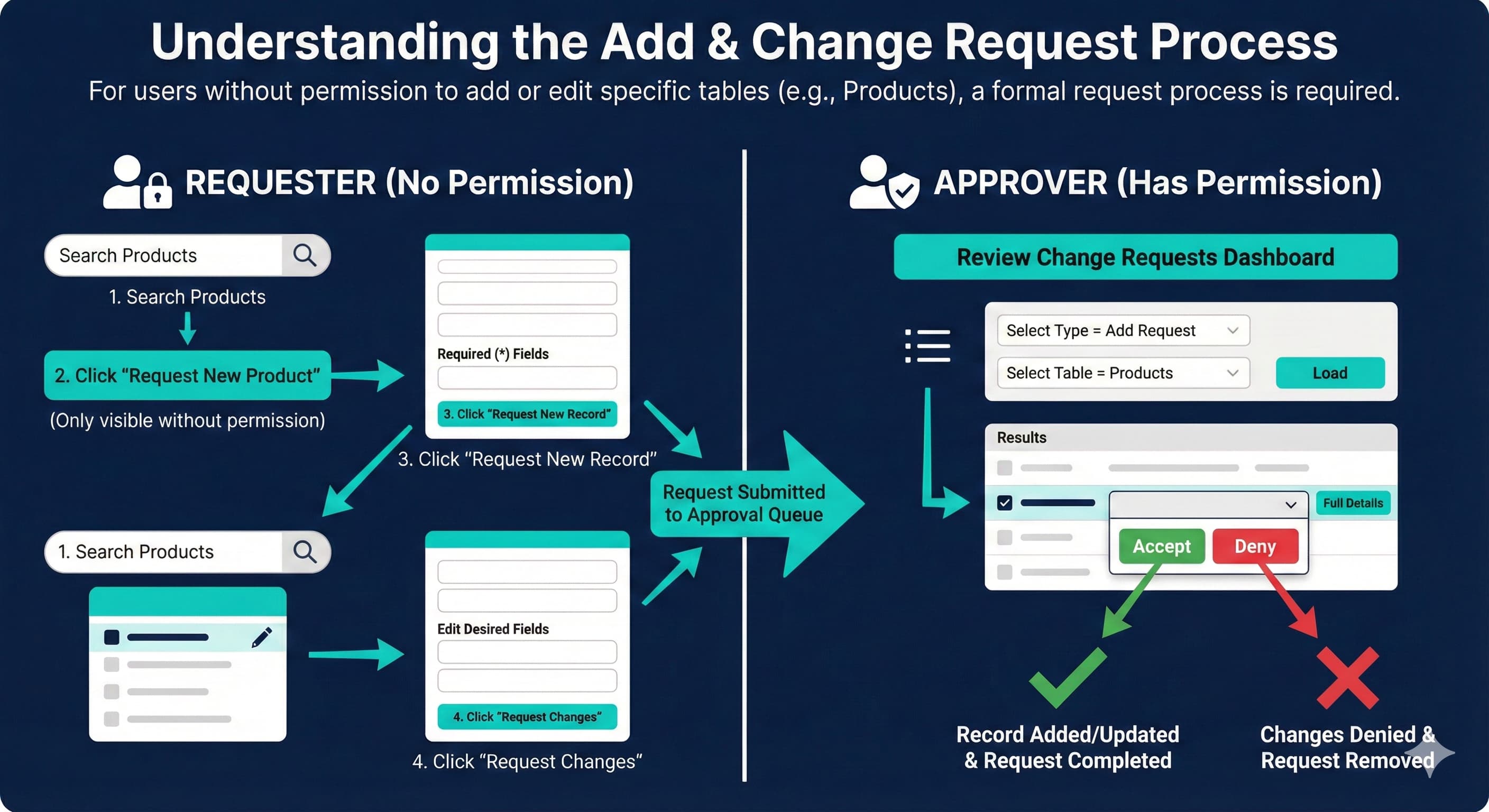
What is a Change or Add Request?
If a user does not have permission to add a record to a specific table or to make an edit on a specific table, they can submit an Add Request or Change Request
In order for their Add Request or Change request to be completed, an individual with permissions for that table must approve the request
How to create an Add Request or Change Request
This guide assumes a user does not have permission to add or edit the Products table. The same concept applies to all tables that a user does not have permission to add or edit.
Search Products on the universal search bar
Click the Request New Product button (only displayed if you don't have the Product Add permission)
Fill in required (*) fields and click Request New Record when ready
Click on the Edit or Pencil Icon next to the product you’d like to edit
Edit the Desired Fields. Then click the Request Changes button
Approving an Add or Change Request
Requests can only be approved by someone who has permission to edit the fields and/or table the request was made for.
Using Universal Search, navigate to the Review Change Requests dashboard
Select Type = Add Request
Select Table = Products
Click Load
Click the drop-down next to the change you'd like to accept and select Accept
You can also click the Full Details button to see all details for that record
Clicking Deny will deny the requested changes and remove the request from the list